This blog post focuses on the final stage of the Watchpoint project, I translated the app into a responsive website version. This stage introduced new design challenges and opportunities, especially when adapting a mobile-first UI into a layout that works across larger screen.
Responsive Design & UI Differences
Creating a responsive design meant rethinking the entire UI to suit desktop interactions. Unlike mobile, web interfaces support hover states, giving me the chance to implement additional feedback for users, such as hover-over buttons that change colour. Since these interactions aren’t available on mobile, I had to carefully plan new UI elements to ensure they were both intuitive and functional.
Rather than simply stretching the app design, I manually scaled and restructured every page to make use of the larger surface area. A new navigation bar was introduced at the top of the site instead of the mobile-style bottom navigation bar, creating a more traditional and accessible layout for desktop users. Bottom navigation bar aligns with the “thumb rule of design”. It works on the principle, that most app users scroll and navigate apps using their thumbs. Hence, the primary and significant screens and pages within an app, should be easily accessible by a user’s thumb. (appmysite, 2025) Whereas, on a website you use a cursor so it doesn’t need to be at the bottom.
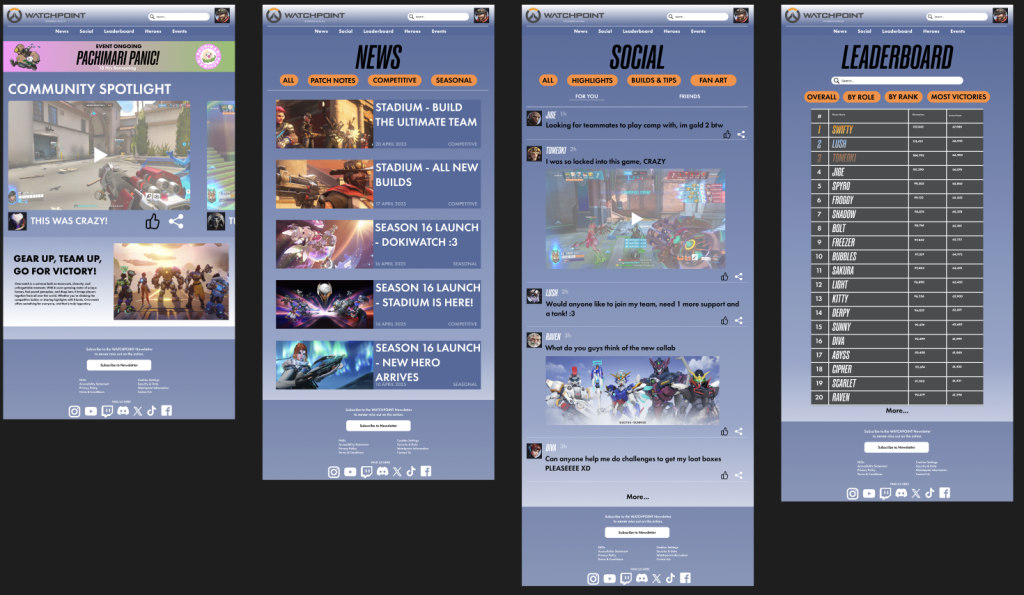
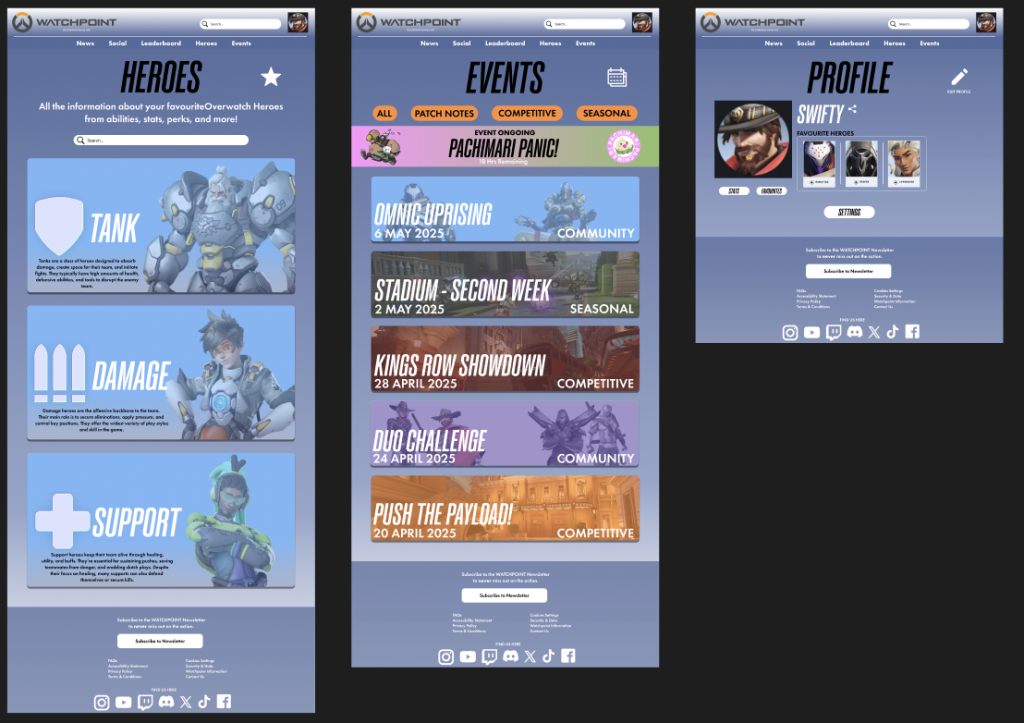
Some pages were redesigned entirely to suit the desktop experience. For example, the social and heroes pages now include more detailed text and information since there’s more space to work with. This makes browsing and learning about the game more comprehensive on the website. Additionally, I implemented an animated ongoing event banner on the home and events pages, much like the app but with more screen presence, it draws the users attention to it instantly. Also, features like events and heroes, which were initially part of the mobile home page, have now been moved into the main top navigation bar. This makes better use of desktop screen real estate and helps users get to what they need faster.
Despite the layout changes, the core functionality remains the same. Users can still interact with posts, view highlights just like the mobile app. Careful design choices were made to ensure that the desktop experience is just as accessible and easy to use, with smooth navigation, clear visual hierarchy, and strong colour contrast carried over from the mobile design.
The tablet version of the Watchpoint app closely follows the desktop website layout, taking advantage of the increased screen size while still supporting touch-screen interactions. Unlike the desktop version, the tablet design wouldn’t include hover-based functionality and instead focus on tap-based gestures and larger touch buttons to ensure a smooth and accessible experience. This approach maintains visual consistency across platforms while adapting to the specific needs tablet users.
References:
appmysite (2025) Bottom navigation bar in mobile apps: Here’s all you need to know. Available online: https://www.appmysite.com/blog/bottom-navigation-bar-in-mobile-apps-heres-all-you-need-to-know/ [Accessed 5/5/2025].
Imagery:
Blizzard Entertainment (2023) REP YOUR FAVORITE OVERWATCH 2 HERO WITH NEW BATTLE.NET AVATARS! Available online: https://overwatch.blizzard.com/en-us/news/23935224/ [Accessed 5/5/2025].
Blizzard Entertainment (2025) HEROES. Available online: https://overwatch.blizzard.com/en-us/heroes/ [Accessed 5/5/2025].
Blizzard Entertainment (2025) NEWS. Available online: https://overwatch.blizzard.com/en-us/news/ [Accessed 5/5/2025].
Overwatch Wiki (2025) Pachimari. Available online: https://overwatch.fandom.com/wiki/Pachimari [Accessed 5/5/2025].
Overwatch Wiki (2025) Heroes. Available online: https://overwatch.fandom.com/wiki/Heroes [Accessed 5/5/2025].
Overwatch Wiki (2025) Maps. Available online: https://overwatch.fandom.com/wiki/Maps [Accessed 5/5/2025].
Figma Board: